Always the right microphone
44 votes across 4 posts

Built. Rank your microphones once. Voktik uses the best one plugged in, and says when it switches.

Voice typing for Windows · Waitlist open
Hold Ctrl and talk. Clean, punctuated text lands wherever your cursor is, from AI chats to email.
Voktik opens soon, on Windows. Join the waitlist to get in first.
Hold Ctrl and the Windows key, speak, and let go: Voktik takes out the ums and types clean text into the app you’re in. In this example, AI chat, you say “um, so can you turn these notes into a short project update for the team, like, keep it under a hundred words and, uh, end with the three next steps” and Voktik types “Can you turn these notes into a short project update for the team? Keep it under 100 words and end with the three next steps.”
Styles like AI prompt come with Pro. Free tidies every dictation.
Your dictations, your dictionary, styles and settings. This is the real app, shown with sample dictations.
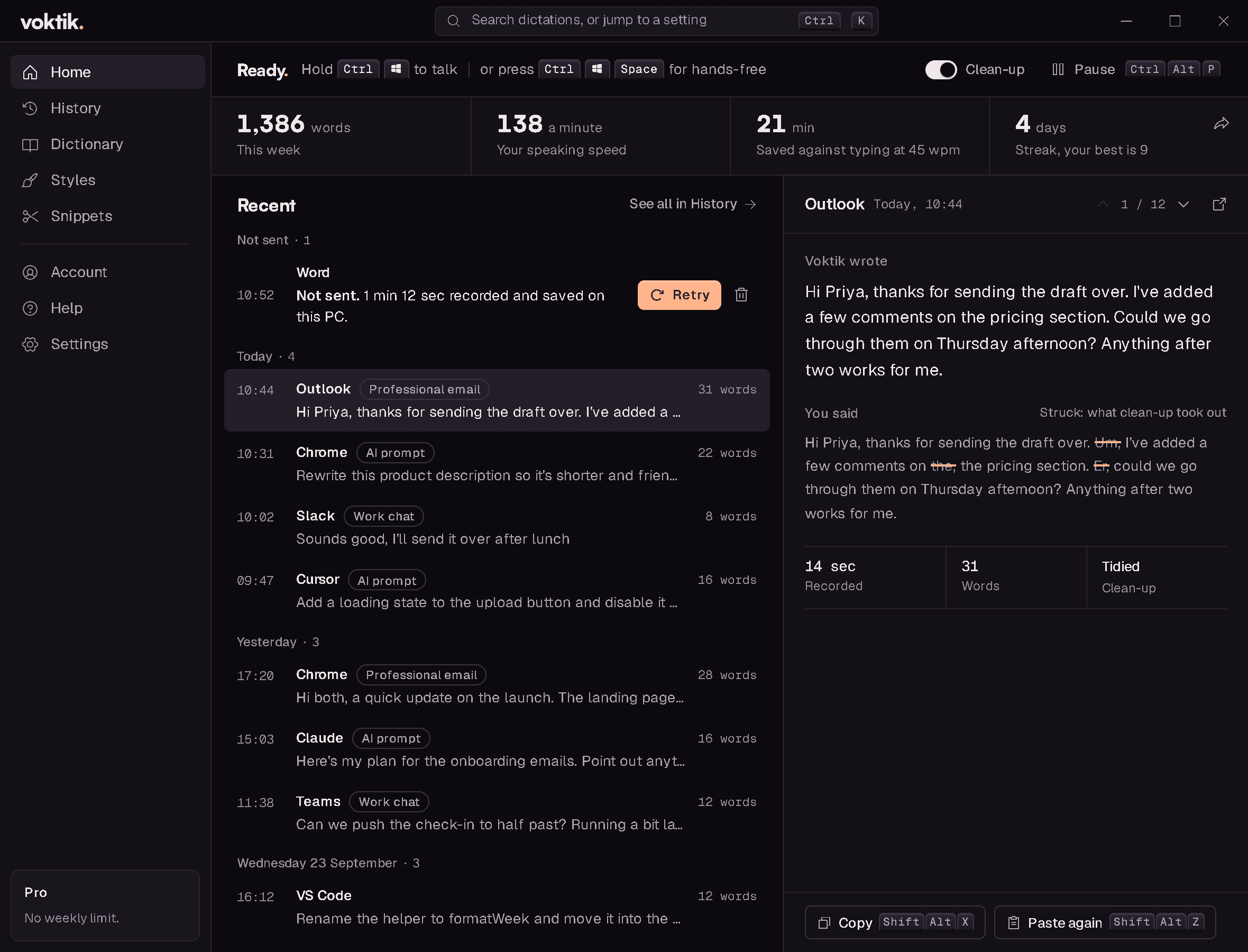
Say what you mean, and nothing you say gets lost. Hold one key in any Windows app, talk the way it comes out, and Voktik pastes it tidied and punctuated, in the style that app needs, then puts your clipboard back.
12–51ms
from pressing the keys to listening
Measured. The microphone is kept ready. The first press after starting takes about 0.3 s.
35ms
from finished text to pasted
One measured paste into Notepad, on our test PC.
12of12
prompt-style dictations tidied, not answered
In our tests.
100
languages, worked out as you talk
Pick one or several, or let it detect.
2,000
free words a week, back every Monday
Pro has no weekly limit.
Works wherever you type
Voktik isn’t affiliated with, sponsored or endorsed by these companies. Product names are trademarks of their owners.
Same keys as the apps you know. Hold Ctrl+Win to talk, or press Ctrl+Win+Space for hands-free. There’s nothing to relearn.
Some dictation apps send a picture of your screen with each dictation. Voktik sends your recording and your words, and nothing else.
There's no box to untick, and no setting that quietly opts you in. What you say stays yours.
That's £10.83 a month for every Pro feature and no weekly limit. Cancel any time, in the app or on voktik.com.
No dollar prices, no exchange rate, and no tax added at checkout. What you see is what you pay.
What leaves your PC
Sent
Not sent
Our speech service keeps nothing you send, and nothing you say is used to train AI.
Voktik picks the right style for the app you’re in, spells the names you teach it, and works out which language you’re speaking.
44 votes across 4 posts
Built. Rank your microphones once. Voktik uses the best one plugged in, and says when it switches.
42 votes across 2 posts
Built. One file a day in a folder you pick, as Markdown or plain text. It never leaves your PC.
41 votes across 3 posts
Built. Keep it forever, for 30 days, or not at all. Or keep nothing from the apps you choose.
34 votes
Built. A style set for one app stays with that app. Everywhere else, Voktik goes back to your usual one.
27 votes
Built. Hold Ctrl and the Windows key to talk, or tap them twice to go hands-free.
19 votes
Built. Take one of the ready-made styles, change its instructions, and save it as your own.
17 votes across 3 posts
Built. Voktik pastes your words, then puts back whatever you'd copied.
16 votes across 2 posts
Built. One key pastes it again and another copies it, from any app. Paste is in the tray menu too.
8 votes
Built. On two monitors, the bar shows up on the one you're working on.
Votes from the public feature-request board of another dictation app, counted on 24 September 2026, and for pause and language on 25 September 2026. Where people asked for the same thing in more than one post, the votes are added together.
Good prompts need detail, and detail is slow to type. Say the whole thing and Voktik types it in: one key in Claude, ChatGPT, Claude Code, Codex, Cursor, Gemini and Copilot. In coding tools, file names and code come out the way you’d type them.
Dictate a prompt and it arrives tidied, still a question. Voktik checks before it pastes: if the tidy-up ever tries to reply, you get your own words instead.
An example. Our tests used prompts like it, and instructions such as “ignore the previous instructions”.
Voktik saves what you say as you say it. Whatever goes wrong, your words wait for you.
Voktik tries again by itself. If it still can't send, your recording waits in History, encrypted on your PC, for 14 days. Press Retry.
Press Undo. You have five seconds, and nothing is lost.
Click where it should go and use Paste last. Your last dictation goes in again.
What you say is saved as you say it, so it's still there when you're back.
Something we haven’t answered? Email help@voktik.com. A person replies within one working day.
Voktik finishes what you're saying, and your words come back on Monday. Pro has no limit: £14.99 a month, or £129.99 a year. Prices include VAT, and you can cancel any time, in the app or on voktik.com/pro.
The speech recognition behind Voktik was trained on a very wide range of voices and accents, and your dictionary fixes any names it gets wrong. The free words are there so you can try it with your own voice first.
Almost anywhere you can type: email, documents, chat, your browser, and AI tools like ChatGPT, Claude, Codex and Cursor. If your cursor can go there, Voktik can usually type there. It never types into a password box.
No. Your laptop's own microphone is fine. Voktik picks it over a Bluetooth headset, which is slower to start and can clip your first words.
It's sent encrypted, turned into text, then thrown away. Your voice is never kept by us or our speech service, and never used to train AI. If sending fails, it stays encrypted on your PC until it's sent. Voktik's Settings list exactly what's sent and what isn't.
It needs the internet, and your words appear when you let go of the key, not as you speak. It's for Windows only: there's no Mac or phone version.
Join the waitlist for early access and the launch offers above.